
 InPost UK
InPost UK tracking
The UK's biggest locker network — send, collect and return from 16,000+ lockers and shops, 24/7.
InPost is the locker network: 16,000+ yellow lockers and shops across the UK, most of them open 24/7, where you send, collect and return parcels with a QR code instead of a printed label. Home delivery is a full service too — but the lockers are the point.
Track your InPost UK parcel
Enter your InPost UK tracking number below.
InPost does not publish one single format. The most common UK format is an 18-character code starting JD, for example JD0002210160195973. Use the reference exactly as the retailer sent it, leading zeros included. The 9-digit collection code is not a tracking number.
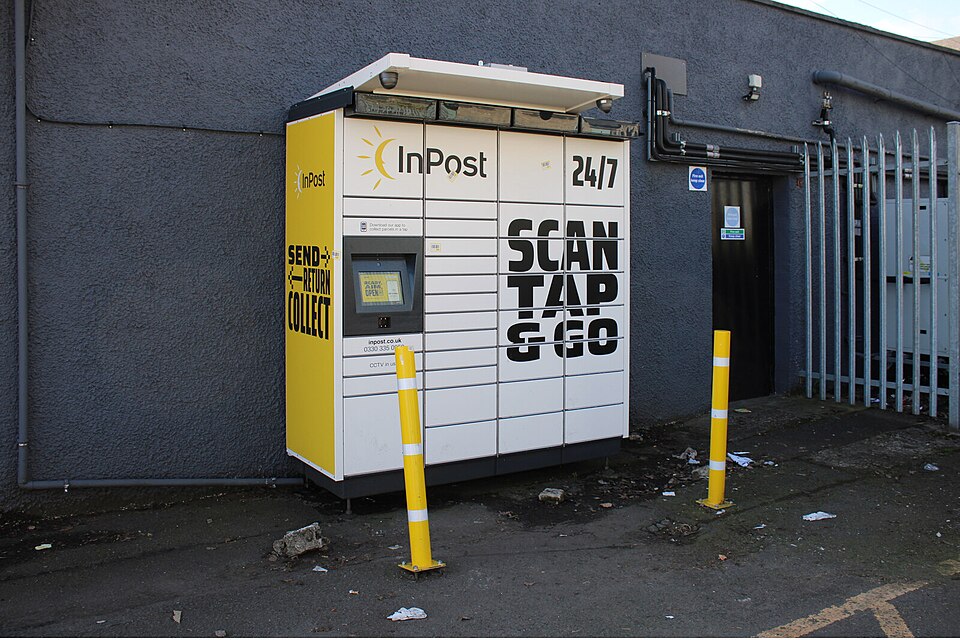
The locker network — send, collect, return
Over 16,000 lockers across the UK, plus thousands of InPost Shops. Most outdoor lockers are open 24/7; shops follow the individual shop's hours. Depots and sorting centres are not open to the public — you cannot collect a parcel from a depot.
Sending is print-free: buy a label in the app or online, get a QR code, and drop the parcel at any Locker or Shop with space. You have 30 days to drop it off (refunded if unused). One parcel per compartment, max 15 kg.
Two things people get wrong: from 1 March 2025 InPost Lockers no longer accept Evri parcels — don't try to drop one there. And if you sell on Vinted, InPost is one of its main carriers: the buyer pays for the label and the digital QR code lives in the Vinted app.
What it costs to send with InPost
InPost prices by size, not weight — the only courier on this site with an official public price list. Cover up to £50 is included on app-bought labels, upgradeable to full-value cover up to £500.
| Size | To a locker or shop | To a home address |
|---|---|---|
| Small — 8 × 38 × 64 cm | £1.99 | £2.89 |
| Medium — 19 × 38 × 64 cm | £2.59 | £3.99 |
| Large — 41 × 38 × 64 cm | £3.99 | £5.99 |
All sizes max 15 kg. Prices from InPost's official price list (inpost.co.uk/send/parcel-prices).
Your InPost UK tracking number
InPost does not publish one single format. The most common UK format is an 18-character code starting JD, for example JD0002210160195973. Use the reference exactly as the retailer sent it, leading zeros included. The 9-digit collection code is not a tracking number.
Example format: JD0002210160195973 — that is a shape, not a real parcel. Enter your own number exactly as the sender gave it: a single wrong letter is the most common reason a tracker says “not recognised”.
JD numbers still track on InPost — the old yodel.co.uk/track address now sends you to this same tracker. Yodel became part of InPost in April 2025 and the Yodel brand was retired on 17 July 2026; the Yodel page covers that history. The 9-digit collection code (and the code on the locker screen) is not a tracking number — don't enter it in the tracker.
InPost UK services & delivery times
Drop off at any Locker or Shop with space; one parcel per compartment. Print-free QR label bought in the app or online; 30 days to drop off after buying the label (refund if unused).
Drivers out 7am–9pm Mon–Sat; Sunday only in busy periods. On delivery day you get a 2-hour window in the InPost app once the driver starts the route, and a photo of the home delivery.
Retailer processing may take longer.
Extra small 4 × 23 × 40 cm; Small 8 × 38 × 64 cm; Medium 19 × 38 × 64 cm; Large 41 × 38 × 64 cm. Lockers are emptied at least once a day.
Delivery aims are the courier's stated aims for the service, not guarantees for every parcel. Bank holidays, bad weather and busy periods (especially Christmas) can add a day.
What each InPost UK status means
| Status | What it means | What to do |
|---|---|---|
| Sit tight, your parcel's loading | The sender or retailer is packing it; it has not been handed over yet. | Nothing to do — wait for the sender to drop it off. |
| We're on it | The sender dropped it off; the courier is collecting it shortly. | Nothing to do; the first scan comes once InPost has it. |
| It's on the road | Travelling from depot to sorting centre to local hub. | Nothing to do; gaps between scans are normal. |
| Not long now | At the local delivery centre; drop-off is soon. | Nothing to do — watch for the collection or delivery-day message. |
| Delivery day, yay! | At the locker or shop, ready to collect — you have 3 days. | Collect with your QR code or collection code; a reminder comes with 24 hours left. |
| Tick tock… | 1 day left to pick it up. | Collect today, or share your QR code with someone who can. |
| Uh oh… heading back to sender | Not collected in 3 days, or undeliverable to the point (roadworks, locker fault). | Contact the retailer — only the sender can re-send or refund. |
| It's back! | Returned to the sender. | Contact the retailer for a refund or a re-send. |
Collecting from a locker or shop
You have 3 days (72 hours) from the notification to collect from a locker or a shop — a reminder comes with 24 hours (locker) or 1 day (shop) left. After that the parcel goes back to the sender.
Collect by scanning the QR code at the locker screen, entering your phone number (without the leading 0) plus the collection code — or use Remote Opening in the app, which opens the locker when you're within 10 metres, no PIN or QR needed. At a shop, show the QR code to staff; no ID needed.
Someone else can collect for you: share your QR code or 9-digit code with them. And if two parcels arrive within 28 hours of each other, Multiparcel puts them in one compartment with one collection code — collect both with a single remote open.
You can also divert a home delivery to a locker in the InPost app (only parcels eligible for it; a redirected parcel can't be redirected again). Home-delivery preferences live in the app too: safe place, leave with a neighbour, a what3words location, or a different delivery date — depending on what the retailer's service allows.
Missed a home delivery?
Drivers cannot return the same day — their routes are set. After at least one home attempt, InPost redirects the parcel to a locker instead of trying again the next day — within 500 metres of your address (or within 1 km if the locker you chose was full). Once redirected to a locker, you cannot redirect it back home.
Locker screen dead or won't scan? Use the app's Remote Opening (within 10 m), or call +44 330 335 0950 from the locker. Lockers are usually fixed in a day or two; try another nearby locker. And if the parcel doesn't fit the compartment, don't force it — close the door and tap “My parcel doesn't fit” (app labels must be cancelled in-app and re-bought, refunded).
Parcel stuck or delayed — what to do
- Check the tracker first — “booked / label created” with no scan means the retailer may not have handed it over; ask the retailer.
- No update for 72 hours after InPost received it? Contact Customer Care on +44 330 335 0950 — they will investigate.
- International parcels can take up to a week to reach InPost — no updates meanwhile is normal, so allow a week before chasing.
- “Delivered” but nothing there (home delivery): check the safe place, ask neighbours, look for the delivery photo in the app — then contact the retailer, since only the sender can raise a claim.
- Missed home delivery: drivers cannot return the same day — the parcel goes to a locker within 500 m instead. You cannot redirect it back home.
- Locker screen dead or won't scan: use Remote Opening in the app (within 10 m), or call +44 330 335 0950 from the locker.
More detail: Parcel stuck in transit — the full step-by-step guide.
Contact InPost UK
Customer servicesInPost Customer Care, Mon–Fri 7am–10pm, Sat–Sun 8am–8pm. Local-rate calls. If you ordered from a retailer, raise it with them first.
If you are the recipient and the parcel is lost or damaged, contact the retailer/sender first — most couriers only accept claims from the sender.
InPost UK tracking — FAQs
What does an InPost tracking number look like?
The most common UK format is an 18-character code starting JD — for example JD0002210160195973. InPost publishes no single universal format, so use the reference exactly as the retailer sent it, leading zeros included. The 9-digit collection code is not a tracking number.
How long do I have to collect from a locker or shop?
3 days (72 hours) from the notification, for both lockers and shops. A reminder comes with 24 hours left (locker) or 1 day left (shop). After that the parcel goes back to the sender.
How much does it cost to send with InPost?
To a locker or shop: Small £1.99, Medium £2.59, Large £3.99. To a home address: Small £2.89, Medium £3.99, Large £5.99. Prices are by size, not weight, and all parcels are max 15 kg.
Can someone else collect my parcel?
Yes — share your QR code or 9-digit collection code with them. They can collect or drop off for you, and no ID is needed at a shop.
My tracking hasn't updated — when should I worry?
Don't panic under 48 hours. If there is no update for 72 hours after InPost received the parcel, contact Customer Care on +44 330 335 0950. International parcels can take up to a week to reach InPost — no updates meanwhile is normal.
Does InPost deliver to my home, or only lockers?
Both. Home delivery arrives within 4 working days, with a 2-hour window and a delivery photo in the InPost app on the day. Lockers and shops are the bigger network — over 16,000 lockers across the UK.
Track with another UK courier
Not InPost UK after all? Your parcel may have changed hands — check the other couriers: